
Building high-impact dashboards from scratch is a notorious time sink. Even with clean data, designing a layout that effectively communicates KPIs can take days slowing down your speed to insight. This is where Power BI templates become a game changer.
By providing a pre-configured framework, these templates allow you to bypass the design phase and move straight to analysis. For modern business teams, using a Power BI dashboard template isn’t just about saving time; it’s about ensuring professional consistency across the entire organization.
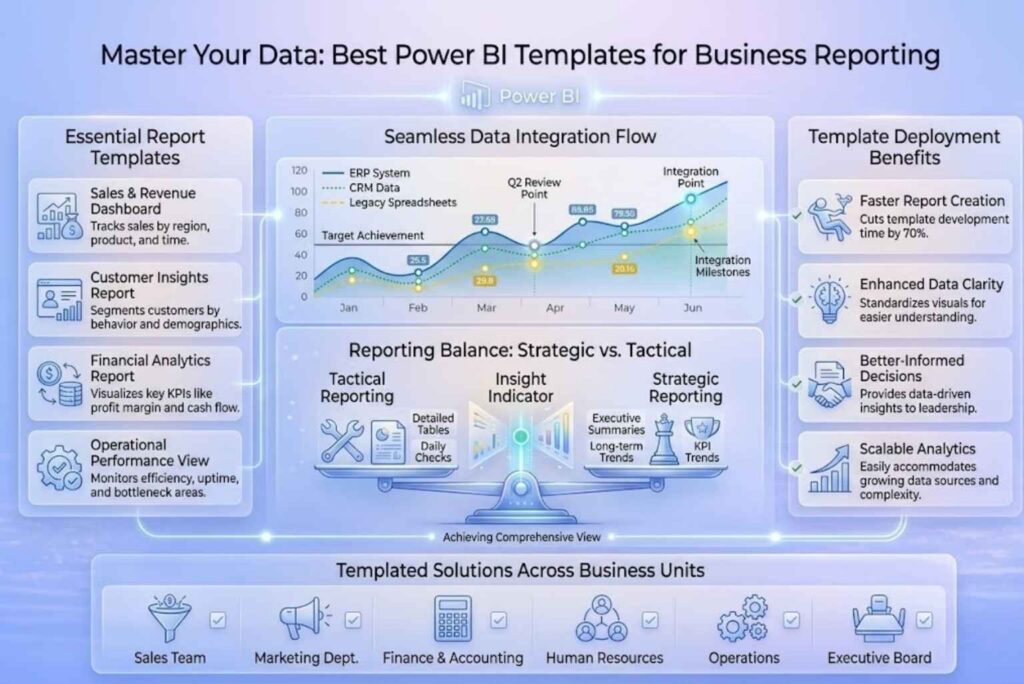
A Power BI template (.pbit) is a pre-built dashboard structure containing the report pages, visuals, and data model logic, but without the actual data. When you import your own dataset, the visuals populate automatically.
Why they matter:
If you are new to the ecosystem, free Power BI dashboard templates are an excellent way to experiment without financial risk. These are typically designed for general use cases and standard data connectors.
Pro Tip: Before you start building, ensuring your date logic is sound is critical. You can download our Free Power BI Calendar Table to ensure your time-intelligence metrics work perfectly with any template.
For growing businesses, paid Power BI templates offer a level of sophistication that free versions lack. These are often optimized for performance and include complex DAX (Data Analysis Expressions) already written for you.
Choosing between free and paid power bi templates depends all on your needs, because both are equally good for different reasons. Free templates are great when you are starting out, since they help you build dashboards quickly without spending a lot of money. On the other hand, paid templates offer more advanced features and better design, thus making them useful for businesses that need detailed and professional reports.
Free dashboard templates Power BI are best for beginners or small teams, because they allow you to create reports easily but may have limited design and features. In fact, free Power BI tools are mainly used for building reports individually, while advanced features like sharing and collaboration often require paid options .
Paid business reporting templates Power BI are better when your business needs advanced analytics, custom KPIs, and team collaboration. Although they require investment, they help you scale faster and create more impactful dashboards, thereby improving decision making.
A template is a foundation, not a finished product. To make it truly yours, follow these steps:
Many users add too many charts and graphs in one dashboard, because they think more visuals mean better insights. Although this may look detailed, it often makes the report cluttered and confusing, thus reducing clarity.
Some users use power bi templates without making any changes. Since every business is different, not customizing layouts, KPIs, and visuals can lead to dashboards that do not match real needs.
The data model is very important for accurate reporting. However, many people ignore it and focus only on visuals, which can result in incorrect or incomplete insights.
Using the wrong dashboard templates Power BI for your industry or goal can lead to poor results. Thus, it is important to select templates that match your business use case.
Some dashboards are built once and never updated. Although this saves time, it can lead to outdated information, which affects decision making and reduces the value of your business reporting templates Power BI.
When businesses build dashboards from scratch, it can easily take 2–3 days because they need to design layouts, set up visuals, and decide on KPIs. This process takes even longer if the data is complex or if the team is not very experienced with reporting tools.
But with power bi templates, the same dashboard can be ready in just a few hours. Since the structure is already built, you only need to add your data and make small adjustments. Thus, instead of spending time on design, teams can focus more on analysis and decision making. This is why many companies prefer dashboard templates Power BI, because they speed up reporting and make the whole process much more efficient.
Power BI templates are the ultimate shortcut to professional business reporting. They allow you to stop “playing with charts” and start managing your business. By leveraging the right structure, you ensure that your data is not just seen, but understood.
Ready to take your data to the next level? For custom Power BI dashboard development tailored to your specific business infrastructure, contact our experts at Data Inseyets today.