
Even in 2026, Microsoft Excel is used by businesses due to its simplicity and familiarity among all users. It is very useful for small tasks, but when dealing with big data, it may be difficult to do so. In the meantime, Power BI is gaining popularity, and that is why the Power BI vs Excel debate is currently more relevant than ever.
Working with the wrong tool may slow down your work and may create unnecessary problems. Knowing the Power BI vs Excel difference will allow you to avoid these issues, because using the right tool makes work faster and a lot easier. So, the big question is: should I use Excel or Power BI? Continue reading to know more!
Microsoft Excel is a spreadsheet tool that helps you store and manage data in rows and columns. With Excel, you can enter your data manually; however, it can feel slow when the data becomes too large. It may also take a long time for you to enter your data. Many people use it daily because it is simple, thus making it ideal for small datasets.
Power BI is a business intelligence tool designed for analyzing data and creating dashboards. For example, learning how to structure your data properly using a calendar table can improve reporting accuracy (Power BI calendar table guide).
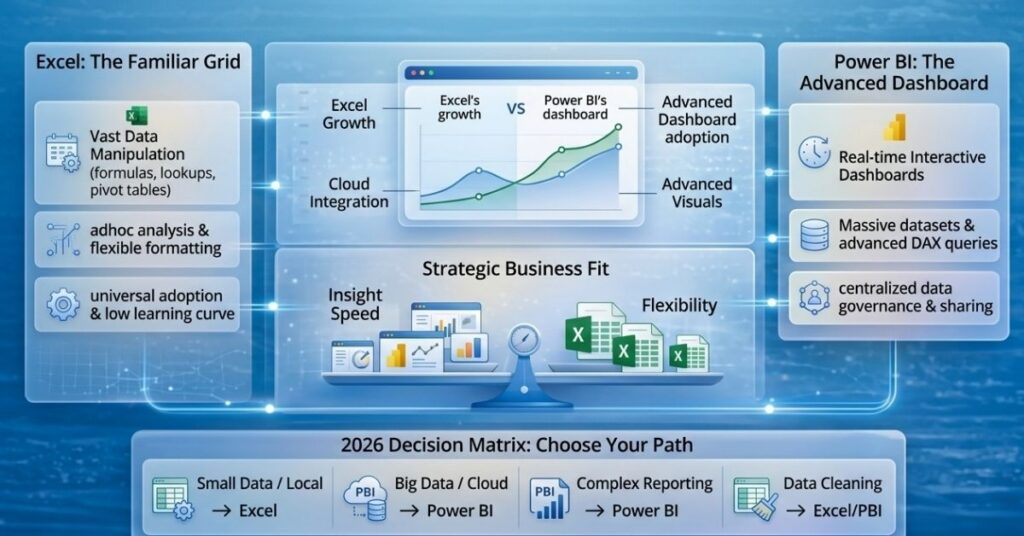
You should use Microsoft Excel when your data is small and tasks are simple. It is great for quick calculations, financial modeling, and ad hoc analysis because you can easily edit and manage data manually. Though it works well for limited data, it may slow down as your data grows, which shows the Excel vs Power BI difference clearly.
For example, Excel is perfect for budget tracking or small business reporting, since these tasks do not need complex dashboards. In the debate of Power BI vs Excel, Excel is a good choice for simple daily work, although it has some excel limitations for data analysis when things become more complex.
You should use Power BI when you are working with large datasets and need real-time insights. It is designed for business reporting and dashboards, thus making it easier to understand data quickly. This is where the Excel vs Power BI difference becomes important, because Power BI can handle data from multiple sources smoothly.
For example, Power BI is ideal for sales dashboards and KPI tracking, since it updates data automatically and saves time. In Power BI vs Excel, Power BI stands out for growing businesses, hence showing clear Power BI benefits over Excel when dealing with complex data.
No, Power BI cannot fully replace Microsoft Excel, although they work very well together. Many people get confused in the Power BI vs Excel debate, but the truth is these tools complement each other rather than compete. Excel is best for data entry as well as basic calculations because it is simple and flexible, while Power BI is better for visualization and insights, thus making complex data easier to understand.
The preferred approach is a hybrid one. Use Excel for input and storing data and use Power BI for creating reports and dashboards. This setup clearly shows the Excel vs Power BI difference, because Excel handles the groundwork while Power BI turns that data into actionable insights. So, when asking, “Should I use Excel or Power BI?” the answer is often both, since combining them gives the best results for modern business needs.
When it comes to Power BI vs Excel, both tools have their own strengths, and the best choice depends on your needs. Excel is great for flexibility, while Power BI shines in scalability. Understanding their differences helps you pick the right tool, though often the smartest approach is to use them together.
To keep learning Power BI, Excel, and data analytics tips, check out more articles on Datainseyets and improve your reporting skills step by step.