
Many businesses still rely on paper forms, PDFs, emails, and spreadsheets to run daily operations. Although these methods feel familiar, they create unnecessary delays in workflow. People fill out forms, send them back and forth, and then someone has to enter the same data again.
Manual data entry causes delays and mistakes. Because information is copied multiple times, errors creep in, thus creating rework and frustration. Approvals take longer than they should, and simple requests get stuck in inboxes.
As businesses grow, these issues become more visible. Operational complexity increases, and form-based processes turn into bottlenecks. Hence, digital form automation becomes a strong starting point for efficiency, since it removes manual steps and keeps data moving smoothly
Digital form automation means using automated business forms to collect data and move it through a process automatically. Instead of filling out paper or sending emails, users submit digital forms for businesses that guide the information to the right place. This saves time because data is captured once and used instantly.
Automated digital forms are very different from static forms. Static forms are just online versions of paper forms; even though they look modern, they still need to be manually tracked and require data handling which is often not very efficient.
Automated forms do more. They trigger actions, send approvals, and connect with other systems. Because of this, work flows forward on its own, thereby reducing delays and keeping operations moving smoothly.
Digital form automation eliminates the need for manual data entry. Since information is entered once, it flows through the system automatically. This reduces mistakes as well as saves time, thereby supporting operational efficiency automation.
Turnaround times also get shorter. Approvals move faster because forms reach the right people instantly. Although manual processes cause delays, automated forms keep work moving without constant follow-ups.
Accuracy and consistency improve as well. Required fields and rules prevent missing data. At the same time, teams gain real-time visibility into operations, so they can see progress, spot delays, and act quickly when needed.
Many everyday processes work better with digital forms for businesses. Purchase and expense requests are a good example. Instead of emails and spreadsheets, automated forms capture details upfront and route approvals automatically, thus avoiding back-and-forth.
HR processes also benefit a lot. Processing leave requests, onboarding forms, updating staff all move faster when workflow automation forms handle steps in order. Since information flows to the right teams, nothing gets lost or delayed.
IT service and access requests become easier too. Forms can trigger tickets, approvals, and system access. The same applies to compliance and service requests, because automated forms ensure rules are followed and every request is tracked from start to finish.
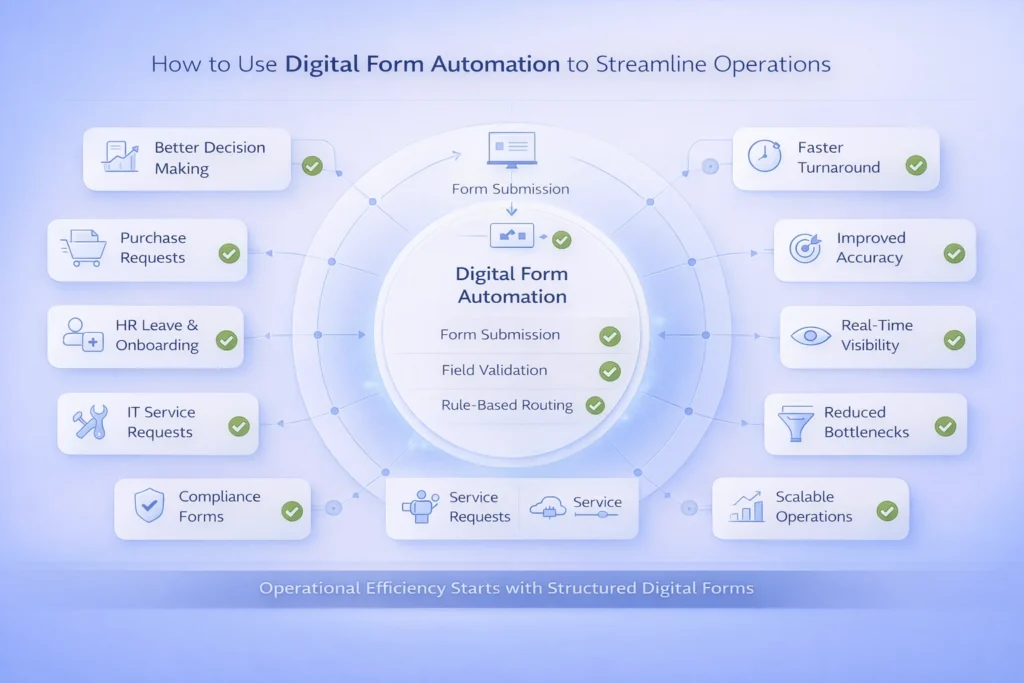
Form automation workflows follow a clear step-by-step flow that keeps work moving without manual effort. It all starts with digital form submission. A user fills out a form online and submits it, which means the data is captured in the system almost instantaneously.
Next is field validation. The system checks if required fields are filled and values make sense. Since errors are caught early, there will be less rework and data stays clean, although this step often goes unnoticed.
Then comes rule-based routing. Workflow automation forms use simple rules to decide where the form goes next. Based on roles, departments, or values, requests are sent to the right people automatically.
Approvals and notifications happen right after. Users get alerts when action is needed, thus reducing delays. Finally, data is stored and integrated with other systems. Because conditional logic is applied, workflows adjust smoothly as needs change.
Effective automated business forms start with smart field validation. Required fields, correct formats, and simple rules all help to prevent errors. Since mistakes are identified early, teams spend less time fixing issues later on.
Conditional sections are another key feature. Forms change based on answers, roles, and/or choices. Although this keeps forms short and clear, it also ensures that only relevant information is collected.
Role-based access controls who can view or approve forms. Automated notifications and reminders keep work moving without needing follow-ups. Along with audit trails and status tracking, these features make automated business forms easy to manage, transparent as well as reliable.
Digital forms act as structured entry points for data. With workflow automation forms, information is captured in a clean and consistent way. Since data is organized from the start, everything that follows works better.
These forms enable downstream automation like approvals, system integrations, and reporting. But although automation sounds powerful, poorly designed forms can break it. Missing fields or unclear questions cause delays, hence slowing the entire process.
To understand results, businesses track how long it takes to move from submission to approval. Shorter cycle times show stronger operational efficiency automation. Since delays become visible, teams can act faster.
Form data also helps identify bottlenecks. As automation improves, errors decrease and throughput increases. Dashboards make it easy to monitor performance and help identify trends, which helps businesses make informed decisions.
Start with high-volume and repetitive processes. These areas show quick wins with digital form automation. Because the same tasks repeat often, small improvements add up fast.
Keep forms simple as well as user-friendly.
Standardize fields across forms to avoid confusion.
Design workflows before building forms, although it may feel backwards but it helps avoid mistakes.
Finally, analyze usage data and iterate, since real feedback helps refine automation over time.
Common Mistakes to Avoid When Automating Forms
Digital form automation helps businesses make faster decisions. Since information flows automatically, managers don’t wait for emails or spreadsheets.
It also ensures consistent execution across teams. Everyone follows the same steps, thus reducing errors and confusion.
Operations can scale without adding headcount. With automated workflows, more requests and approvals are handled smoothly. At the same time, businesses get better data for insights, helping plan and improve processes over time.
Forms are often the starting point for every business process. Automating them unlocks speed, accuracy, and visibility, because work flows automatically and errors drop.
Digital form automation is a foundational step toward smarter operations, thereby helping businesses run faster, cleaner, and more efficiently.