
Dates play a big role in almost every Power BI report. We look at sales by month, compare this year to last year, or track trends over time. But for these things to work properly, Power BI needs help understanding how dates are connected. That’s where a Power BI Calendar Table is helpful. It may seem like a small or boring part of a report, but it quietly does a lot of important work in the background. Read on to learn what a Power BI Calendar Table really does and why so many Power BI reports depend on it to work correctly.
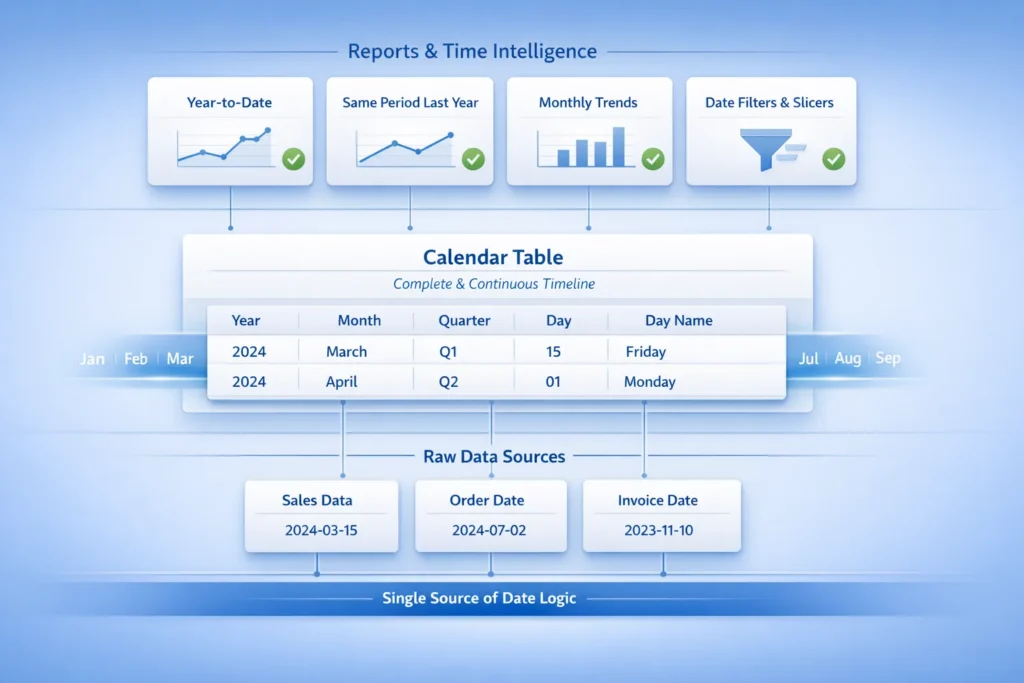
A Power BI Calendar Table is simply a table that contains dates.
That’s it.
It is a list of dates, usually covering many years, and it also includes helpful details about those dates, such as:
So instead of just seeing “2024-03-15,” Power BI can understand that:
This table helps Power BI understand how time works.
This is a very common question.
Yes, there is a possibility that you might already have a date column. For example:
But those dates are just sitting inside your data rows. Power BI sees them as individual values, not as part of a timeline.
A Power BI Calendar Table connects all dates together in one place. It creates a full timeline that Power BI can follow from start to end without breaks.
A calendar table does two things:
Both are needed.
The calendar table plays several important roles behind the scenes.
A calendar table includes all dates, including those with no events.
Why should this be important to you?
Because time-based analysis needs continuity. Power BI needs to know that:
If you don’t have a Power BI Calendar Table, Power BI only sees dates where data exists. Missing dates can create malfunctioning or inaccurate charts or calculations.
This is one of the biggest reasons calendar tables exist.
Calculations like:
All depend on a Power BI Calendar Table.
Without it, Power BI does not know how to move backward or forward in time. Your numbers may look wrong, or the calculation may not work at all.
So if you want to compare this year’s sales with last year’s sales, you must have a calendar table.
When you use a date slicer like:
Power BI uses the Power BI Calendar Table to determine which data is displayed.
This makes filtering:
If you do not have a Calendar Table, then filters can feel confusing or inconsistent.
A calendar table becomes the main place where all date logic lives.
No longer do we need to:
– Create date logic over and over
– Fix date issues in multiple places
When we create a Power BI Calendar Table, we define everything once, and all reports use the same rules.
This creates clean, easy-to-maintain reports.
Many reports may seem to be working well at first. You might build a chart, add numbers, and think everything looks okay.
However, problems often appear later and here are some examples:
The reason this happens is that Power BI is programmed to use a calendar table when dealing with time.
A Power BI calendar table is not merely a “nice to have” but is something Power BI is designed to work with.
Professional reports almost always include one.
If there is no calendar table, you could have problems such as:
In many instances, problems mentioned above can be resolved with a proper Power BI Calendar Table.
Another big benefit is reuse.
You usually need only one calendar table in your model.
Once it is created:
This saves time and avoids mistakes.
No, not at all.
You can:
The method does not matter much.
What matters is that:
Once this is done, Power BI understands how to work with time.
A Power BI Calendar Table may appear simple, but it plays a critical role in any Power BI report. It enables Power BI to accurately understand and manage time-based data. Specifically, it helps Power BI to:
If a report uses dates in any form, which most reports do, a calendar table is required. It is more than just a technical aspect of the report; it is the foundation of a well-built and reliable report.
With a properly built Power BI calendar table, reports become clearer, more accurate, and much easier to depend on when making decisions.