
Spreadsheets became the go-to business tool because they are inexpensive, everybody is accustomed to using them and they are also easy to start using. Almost everyone knows how to open one and add numbers, so businesses relied on them to track information, develop work plans, and manage daily operations. But although they worked well in the beginning, no one can ignore the fact that they were never developed to accommodate the needs of today’s larger, more complicated business operations.
As time passes, hidden costs of manual processes, errors, different versions of the same file get shared around will start to show up. This leads to confusion and slows teams down because staff spend more time fixing mistakes instead of doing real work. Since spreadsheets rely heavily on manual effort, they often lead to operational inefficiencies that grow as the business grows.
As businesses become more complex, spreadsheets simply cannot keep up. They lack automation, real-time updates, and strong controls, thus limiting how fast a business can move. Rapid app development offers a better option in this situation because it replaces manual processes with simple, tailored tools, thereby helping businesses work faster and with fewer errors as well.
Knowing when to move away from spreadsheets becomes clear once they start causing delays and mistakes. If teams are fixing errors, managing multiple file versions, or relying on manual updates, spreadsheets are no longer efficient.
When large amounts of data begin to pile up and more users access the same files, spreadsheet scalability issues begin to appear. Performance drops, automation is limited, and controls around access and compliance become much harder to manage.
In short, the right time to move away from spreadsheets is when manual processes slow the business down. If spreadsheets cannot scale with growth, then it is time to adopt a system built for speed, accuracy, and control.
The main difference in a spreadsheet vs custom app comes down to scale and control. Spreadsheets are simple and also quick to set up, but they struggle as data grows. Security is basic, automation is limited, and reporting often needs manual work.
Spreadsheets also do not perform well when many people use them at once. Changes can overwrite each other, versions get mixed up, and even errors become harder to track. Although they work for small teams, they are not built for busy, multi-user environments.
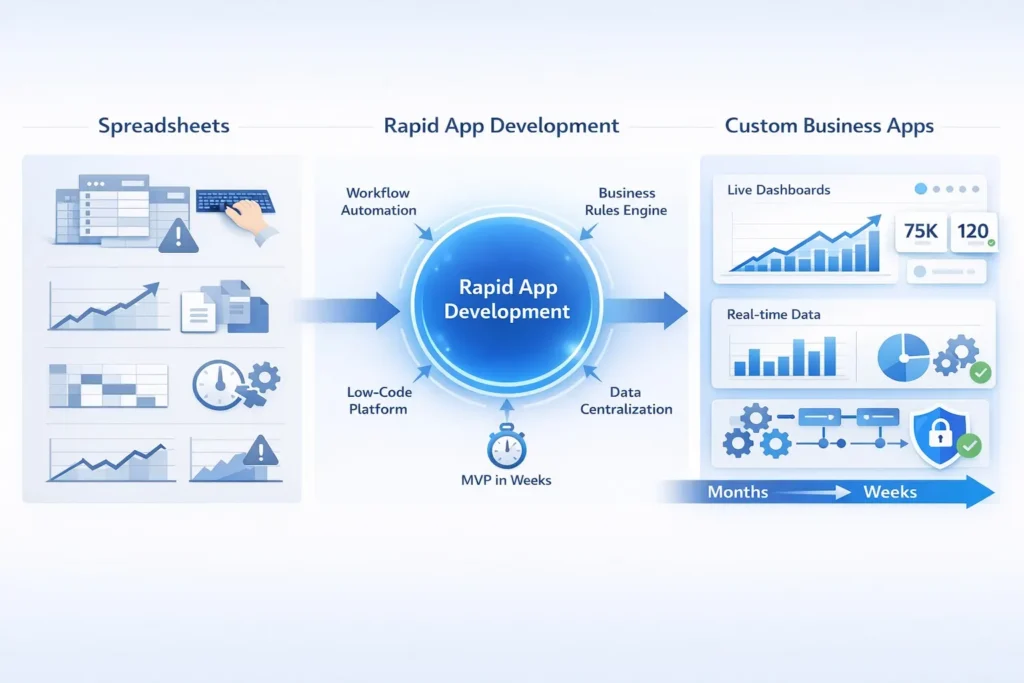
Custom business applications are designed to handle these challenges as they keep all data and logic in one single place, automate tasks, and provide clear reports. Since everything is centralised, teams work faster and with fewer mistakes.
Many businesses still rely on spreadsheet based processes for everyday work. Inventory tracking, approvals, and expense management are often handled in spreadsheets because they seem simple at first. But as data changes daily, manual tracking systems quickly become messy and hard to trust.
Project tracking, sales pipelines, and operations reporting are also commonly run this way. Although spreadsheets can store the data, they do not update in real time. Teams must enter information by hand, thus increasing errors and slowing decisions.
These processes are ideal for automation because they follow clear steps. By replacing manual tracking systems with automated tools, businesses reduce mistakes, save time, and gain better visibility, thereby making work easier and more reliable.
Replacing spreadsheets does not need to be slow or complex. With rapid app development, businesses can replace spreadsheets with apps in weeks by focusing on what matters most and delivering value early.
Start with spreadsheets that are repetitive and error-prone. These files usually cause delays and frustration. Focusing here brings quick wins because small changes can have a big impact.
Next, capture the logic behind the work, such as the calculations, approvals, and data checks. Even though design is important, rules are more important since they ensure data remains correct and consistent.
Low-code platforms and micro apps speed things up. Together with Agile delivery, they enable the teams to build, test, and modify within a short period of time, thereby avoiding long development cycles.
Build a simple MVP that solves the main problem. Deliver it fast, gather feedback, and improve it over time. This reduces risk as well as keeps users engaged.
Replace manual Excel reports with live dashboards like Power BI. Reporting becomes automatic and accurate, thereby improving visibility and decision-making.
Spreadsheet automation for business helps teams move away from manual work faster by automating calculations, validations, and approvals. It removes copy-paste tasks and reduces errors because data flows through clear workflow automation rules. Since changes are tracked and controlled, accuracy and accountability improve, thereby making the transition to apps smoother and more reliable.
Excel-based reporting often breaks when data grows, files get large, or multiple people need access. A Power BI dashboard solves this by giving real-time visibility, so teams always see up-to-date information. It creates a single source of truth for leadership, with role-based access and automated data refresh. By using BI reporting and real-time analytics, businesses can make faster, more accurate decisions without relying on error-prone spreadsheets.
Building a custom internal app can be surprisingly fast. A simple app usually takes 2–4 weeks, while a medium-complexity app may take 4–6 weeks. Speed depends on factors like project scope, integrations with other systems, and approval processes.
Compared to months of fixing errors, managing versions, and updating spreadsheets, internal app development timelines are much shorter. Businesses can build internal tools quickly and start seeing benefits without long delays.
Moving beyond spreadsheets is faster and simpler than many businesses expect. Using custom apps and BI dashboards brings speed, accuracy, and scalability, thereby reducing errors and saving time. Instead of trying to fix every spreadsheet at once, start with one high-impact workflow. Automating this process shows quick results and builds confidence among teams.
Over time, replacing spreadsheets with apps improves efficiency, gives real-time reporting, and frees teams to focus on valuable work. Using custom internal tools built with professional software development services helps businesses scale smoothly and make smarter decisions.