

Even today, many businesses continue to use emails, spreadsheets and numerous follow-ups for approval processes. A person submits a request form, sends an email, waits for a reply, then sends another reminder. Files get lost, versions don’t match, and approvals that should take hours end up taking days.
These delays hurt more than just timelines. They slow down productivity, create compliance risks, and make it even harder for teams to make quick, confident decisions. When approvals depend on people remembering to respond, mistakes and bottlenecks are almost guaranteed.
This is where digital form automation comes in as a smarter solution. With approval workflow automation, forms move automatically to the right people, reminders are sent on time, and everything is tracked in one place. Many organisations now turn to solutions like process automation services to replace manual approvals with faster, cleaner, and more reliable workflows that actually keep business moving.
Manual and email-based approvals waste more time than most teams realise. People spend hours waiting for replies, chasing approvals, and searching old email threads for updates. Important details get buried, and context is often lost along the way.
There’s also a higher risk of mistakes. Different file versions get approved by different people, changes aren’t tracked properly, and audit trails are weak or missing. This makes reviews, reporting, and compliance much harder than they need to be.
You see these issues everywhere such as finance teams waiting on budget approvals, to HR teams handling leave or onboarding requests, as well as operations teams chasing sign-offs for day-to-day tasks. For this reason, many organizations now aim to replace email approvals with forms and move toward internal process automation. Using structured, automated workflows like those supported through professional process automation services helps teams work faster, reduce errors, and keep everything in one clear system.
Digital form automation turns manual forms and email requests into smart online forms. Instead of sending files and waiting for replies, all of this is replaced by the use of one digital form, which initiates the approval process automatically.
Unlike static forms that only collect information, form based workflows guide the request through each step. The system knows who should approve and what happens next.
With digital approval workflows, forms are routed, checked, and tracked in one place. Approvals move faster, updates are clear, and nothing gets missed especially when supported by reliable process automation services.
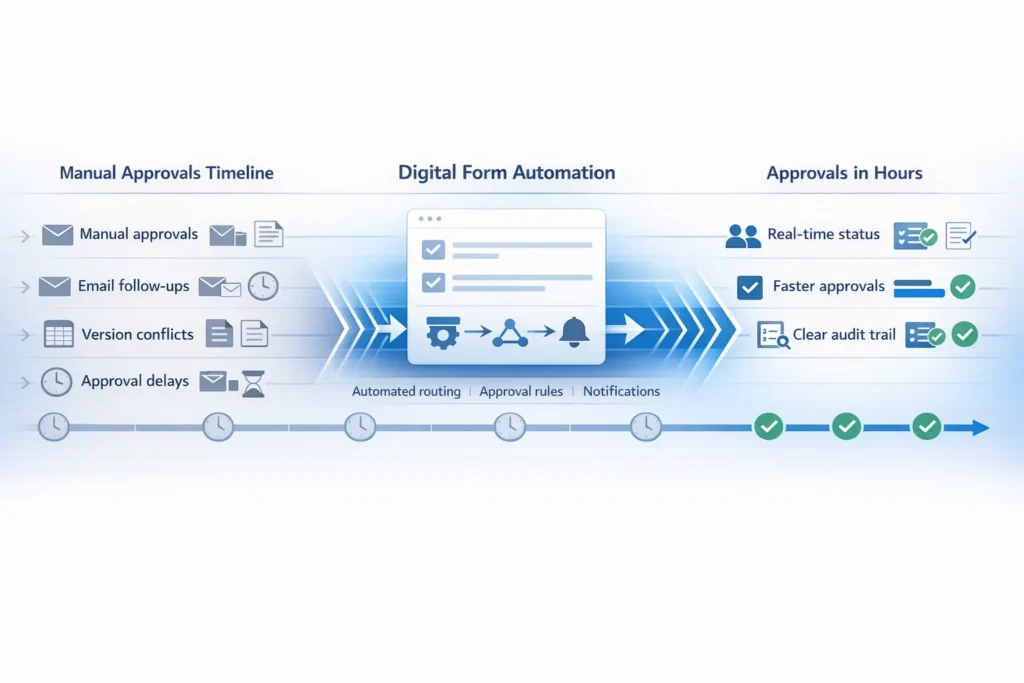
Approval workflow automation follows a simple step-by-step flow that runs on its own. It starts when someone submits a digital form instead of sending an email or document.
The system then uses rules to send the request to the right person. Approvals can happen in stages, with one or more people reviewing based on roles, departments, or limits like budget amounts.
Throughout the process, automated approval workflows send notifications and reminders so nothing gets stuck. Once reviewed, the request is either approved or rejected, and everything is recorded. With the help of workflow automation software, teams get faster decisions, clear tracking, and far less manual follow-up
With digital form automation, the entire process is consistent and all requests come through one system. There is no need to manually search emails or attachments and everyone has access to the same information.
Forms are sent to the right approver the very first time. Rules decide who approves based on role, department, and/or amount to make approval workflow automation fast as well as accurate.
Requesters can instantly see where their approval stands. This eliminates the need for continual follow-ups and and “where is my request?” messages.
Forms can check for missing or incorrect details before submission therefore it helps to expedite the process and avoids back-and-forth and keeps approvals moving smoothly.
Multiple people can approve at the same time instead of waiting on each other. This cuts days down to hours.
Automatic reminders gently prompt approvers when they need to take action, and any escalations happen on their own with no one has to chase anyone.
Every step is tracked and recorded. With clear reports and full visibility, all decisions are faster and more confident especially when powered by reliable process automation services.
These are all examples of business process automation and internal process automation which saves time as well as reduces errors.
As a business grows, manual approvals slow everything down. Emails get lost, people forget steps, and bottlenecks appear.
Workflow automation software solves this by handling more requests without needing extra staff. Automation not only keeps approvals moving smoothly but also ensures consistency across departments and locations. All business teams follow the same procedures which reduces mistakes and makes business process automation a real time-saver.
Digital form automation turns slow, email-driven approvals into fast, efficient workflows with a clear view of who has approved and when, as well as reduces clerical errors.
The use of email and spreadsheets alone will no longer allow businesses to operate as effectively as necessary, and thus moving to automated forms is essential for speed, accuracy, and smarter decision-making.
Businesses can reduce the amount of time they spend waiting for approvals from days to hours especially when supported by professional process automation services.