
Software teams today are under more pressure than ever to deliver products quickly. They must meet strict deadlines, and customers expect constant updates, and traditional workflows, full of hand-offs, manual fixes, and repetitive tasks can only move so fast. Despite having access to great tools, most developers find that there is still a lot of busywork that slows everything down.
That’s why so many teams are suddenly paying attention to agentic AI. It isn’t just another autocomplete or code helper. But these new emerging AI development tools can actually take action on their own for example running tests, making changes across files, analyzing logs, and handling the small but time-consuming tasks that often pile up. It’s very similar to how BI dashboards like Power BI speed up business insights by automating the heavy lifting behind the scenes.
With all the talk around AI workflow efficiency, the big question now is simple: can agentic AI truly help developers build software faster, or is it just another shiny tool?
Agentic AI basically means autonomous, goal-directed AI agents that can take on a task and actually follow through without you guiding on every step. So instead of just giving you code suggestions, these autonomous coding agents can also plan what to do, run actions, check the results, and keep going until they hit the goal. It’s more like giving the AI a mission rather than just typing a single prompt.
Unlike regular copilots or prompt-based tools, which rely on human direction to tell them what to do next, Agentic AI can reason on its own and decide the next action (or act). A typical example of such a system would be if you instructed the Agentic AI “Fix this login bug,” and it will read the code, make changes, run tests, and adjust if something breaks. Or you could ask it to write new tests, hook up a simple API integration, or clean up messy code and it won’t just generate text, but also execute the steps needed.
It works through an “autonomous reasoning + execution loop,” which means it thinks about what needs to happen, tries an action, checks the outcome, and then repeats the cycle until the job is done. Since it can keep improving its own work, it ends up feeling less like a tool and more like a junior developer who doesn’t get tired. And because this new wave of generative AI for developers can handle real tasks, not just suggestions, it’s gaining attention fast.
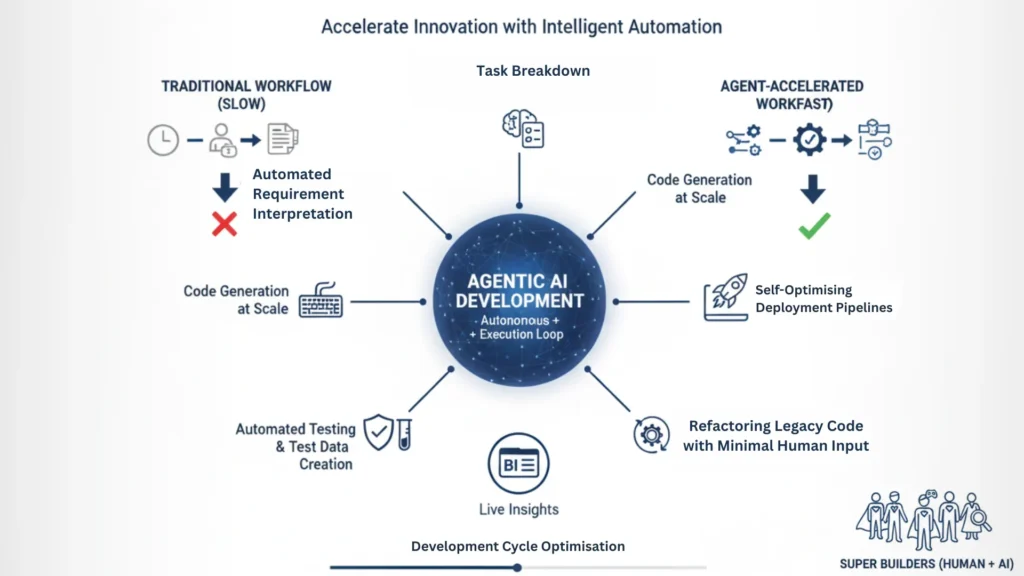
Agentic AI can read product requirements and turn them into clear development tasks. This reduces the amount of time you spend planning, as it takes much less time than manually break everything down yourself. In a way, agentic AIs function like business intelligence (BI) tools that turn raw data into easy visuals but instead of showing you the statistics around your business, these tools present the roadmap for your product’s development.
These agents don’t just write small snippets. They can create full modules, features, or whole sections of an app. What used to take days can sometimes drop to hours because the AI moves fast and doesn’t need breaks.
With AI-assisted testing, everything a lot easier because agents can write test cases, run them, and even generate the data needed. This also reduces a lot of time spend on QA since the AI keeps checking and fixing things without waiting for a human.
Old or messy systems usually take forever to clean up, but agentic AI can go through them quickly. It can reorganize code, remove old patterns, and document things along the way kind of like how BI automation helps modernize old reporting systems.
Agentic AI can watch your CI/CD pipeline and fix slow steps or errors on its own. This AI CI/CD automation helps remove release bottlenecks, so deployments happen faster and with fewer headaches.
Agentic AI works really well and has an exceptional performance where the work is defined and repetitive. For example, logic-heavy coding or handling lots of small tasks in modular microservices are great fits. Another advantage is its effectiveness with data jobs such as ETL flows, dashboards, or simple forecasting models because the steps are usually predictable. And since it’s good at handling routine tasks, it’s very handy for building internal tools and automations.
But there are areas where agentic AI doesn’t shine. If you’re building something totally new or unclear, the AI may get confused because it doesn’t know the direction. It also struggles in environments with strict security rules since it can not freely access everything it needs. And for systems that need deep domain intuition like understanding niche business rules, it may fall short.
These AI development limitations and AI coding challenges show that while agentic AI is powerful, it’s not a perfect fit for every project.
When people talk about “time savings,” they don’t just mean writing code faster they also include every step that goes into getting the final product out the door. Agentic AI assist helps in all these steps because it handles a lot of the slow, repetitive work.
Here are some realistic ranges teams are seeing:
For example, a feature that normally takes a week could potentially take only three to four days. This also means testing cycles can be shortened, for example, a testing cycle that normally takes two days could take one day instead. It’s similar to how BI dashboards like Power BI cut down the time it takes to analyze data once the boring parts are automated, everything else moves quicker.
With this kind of AI productivity boost, teams are starting to see real development cycle optimization, rather than just small improvements.
Agentic AI won’t replace developers, but it will make them faster and stronger. Instead of doing every small task, developers will guide the AI, check its work, and focus on bigger decisions. Humans still bring the domain knowledge and system thinking the AI can’t copy and can’t replace ever. So the future looks like AI-enhanced engineering, where the AI does the heavy lifting and developers act more like super builders.
Agentic AI, powered by AI & LLM Integration, can speed up planning, coding, testing, and deployments, but it still works best with clear human direction. When you mix tools like BI dashboards with agentic AI through strong AI & LLM Integration, you get a workflow that’s both data-driven and highly automated. This means developers can spend more time solving real problems while the AI handles the repetitive stuff. The next era of software development is simple, and it’s going to be much faster because it’s agent-accelerated.