
Many organizations still rely on old, rigid systems because they’ve been in place for years, but these legacy systems come with big challenges. Specifically, no APIs, limited integrations, slow reporting, and lots of manual work. This makes automation in restricted IT systems very hard and keeps teams stuck in performing repetitive tasks. BI can provide automation solutions to allow users to automate their repetitive processes. It adds automation around these legacy constraints, reduces manual workloads, and creates smart ways to get more done without having to completely build a new system. BI-driven automation patterns are a modern workaround that lets companies work faster and smarter while also keeping their old systems in place.
BI-driven automation patterns are simple automation approaches created using BI tools, analytics, and workflow logic. Instead of relying on deep system access or fancy integrations, these patterns use the data you already have to trigger actions, send updates, or simplify routine tasks; therefore, they serve as a smarter way of using analytics to automate work that used to be manual.
These patterns work well even when backend systems are locked down, because they don’t need full control of those systems. They mainly read data, spot changes, and then use analytics-driven workflows to keep things moving. Tools like Power BI (even if used indirectly) help by automating reports, surfacing insights, and creating data flows that can act like triggers for other tasks.
The idea of “pattern-based automation” is that once you build one of these workflows, you can reuse it across teams or processes. This allows BI Automation to be scalable, repeatable and maintainable by anyone with minimal effort and without touching the legacy system itself.
It’s tough to automate legacy systems because they were designed to operate differently than most modern technological systems; they do not have proper APIs so connecting them to new tools feels almost impossible. On top of that, the data is often stuck in old formats or hidden away in siloed databases, making it all but impossible to quickly access and automate. And since the code base can’t really be changed, you’re basically working around a system that refuses to move.
These systems also rely on slow batch processing, so nothing happens in real time. Add heavy IT controls and strict risk rules, and even simple changes can take forever. This is all why legacy system automation feels like such a challenge; therefore, it’s not that teams don’t want to automate, but rather it’s just the outdated infrastructure that gets in the way.
Because of all this, BI becomes the safest and easiest layer for bringing in some level of modernization. Instead of touching the legacy system directly, BI works around it, pulling data, creating insights, and helping automate tasks without breaking anything. It’s a simple way to move forward without risking the old system you still depend on.
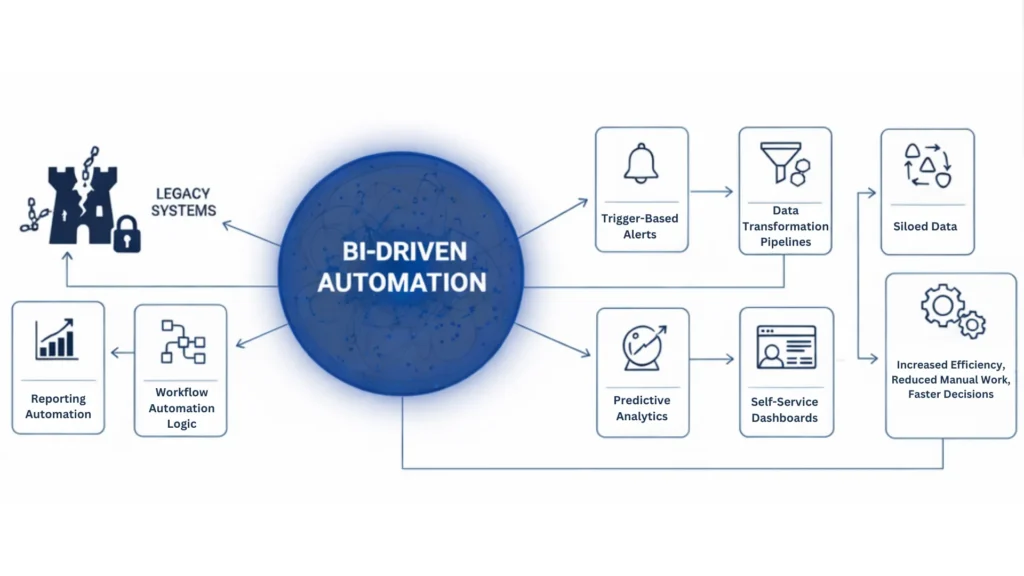
One of the simplest BI patterns for efficiency is automating reporting. Rather than pulling data from legacy sources manually, BI can automatically extract, clean, and combine it for you. Thus, eliminating manual work in Excel saves your team hours every week. With an automated refresh cycle, there is no need to manually copy-paste or redo the same tasks. It’s clean, simple automated reporting that finally makes data consolidation painless.
Business Intelligence (BI) can find issues with Legacy systems quickly. By implementing business intelligence for legacy environments, you can set up alerts for anomalies, errors, or whenever something crosses a certain threshold. These automated alerts go straight to the right teams be it operations, finance, IT so issues get handled faster instead of sitting unnoticed. It’s a quick win for beating the slow monitoring that usually comes with old systems.
Many legacy systems still spit out old-school files like CSVs, SQL dumps, or flat exports. BI tools can turn these clunky outputs into clean, unified, usable data through transformation pipelines. This makes the information far more actionable and supports legacy system automation even when you can’t change the original system. It becomes a smooth modernization workflow built on top of whatever data the legacy tool can give you.
BI doesn’t just create reports—it can also feed workflow tools like Power Automate or Zapier. This helps automate things like approvals, routing, and notifications, even when working inside automation in restricted IT systems. A common example is automated invoice routing: BI classifies the data from legacy records, and the workflow engine handles the rest. It’s an easy way to build automated workflows without touching the legacy code.
Even if your data comes from legacy sources, BI can still run predictive models on top of it. This means you can forecast failures, demand spikes, workload changes, or resource needs without altering a single line of legacy code. These BI-driven automation patterns help avoid bottlenecks before they happen, giving teams a smoother, more data-driven efficiency approach.
Self-service dashboards let teams explore data, filter insights, and answer their own questions without waiting for IT. This cuts down the request backlog that usually happens in restrictive IT departments. It also reduces the need for legacy-based reporting and gives teams more independence. As a result, BI patterns for efficiency turn into real operational autonomy with simple, accessible self-service BI.
BI tools act like a digital bridge between old systems and modern ways of working. They can pull data from legacy sources, clean it up, organize it, and then use it to automate tasks without needing to change the legacy system itself. This makes business intelligence for legacy environments incredibly helpful because it works around all the usual limits.
Tools like Power BI (even when mentioned lightly) add features such as scheduled refreshes, dataflows, data modeling, and role-based access. All of this helps create small but powerful automations that sit on top of the old system. Instead of doing a massive migration, organizations can modernize step by step. It becomes a smooth form of transitional automation where things get better over time, not all at once.
Not every company can replace its legacy system right away. Sometimes the cost is too high, the risks are too big, or the system is tied to strict regulations that make migration difficult. In other cases, the data is too tangled or the process of moving everything feels overwhelming. These legacy constraints often slow down modernization decisions, even when everyone knows the old system needs improvement.
In situations like these, automation in restricted IT systems powered by BI becomes the most practical choice. The advantages of BI-Power Automated Business Processes are tremendous for the Short-Term and Mid-Term because it lets you automate tasks, clean up data, and boost efficiency without touching the legacy code. Platforms such as Data Inseyets can support organizations in implementing these improvements more effectively. BI-driven automation gives teams quick wins; additionally, it reduces manual work and buys time until a full system replacement is actually possible. Overall, it’s a smart way to modernize gradually while avoiding unnecessary disruption.
BI-driven automation patterns provide businesses with quicker, more accurate, and more visible results to enhance their legacy systems. They make work easier, reduce manual tasks, and scale as the business grows, all while working around restrictive IT environments. Starting with BI-based automation is a smart move because it delivers real BI modernization benefits right away while also allowing teams to modernize step by step without having to wait for a Major Overhaul of the whole system.