
Automating business processes is indeed a fabulous idea and sounds great in theory, but in many companies, it feels almost impossible. Legacy systems, strict governance rules, data sitting in silos, and compliance-heavy IT setups make even simple tasks slow and complicated. Consequently, teams spend more time managing their data and verifying the accuracy of that data rather than using it, which makes enterprise automation seem out of reach.
The answer is clear:
Smart BI strategies can unlock automation even in restricted IT environments. Modern BI platforms, like Power BI, are designed to follow strict security and data governance rules while automating reporting, dashboard and alerts. They create a secure, governed framework that makes it possible to streamline workflows without breaking any policies.
In short, even when IT feels locked down, BI can help companies move toward automation safely, efficiently, and in a way that IT actually approves.
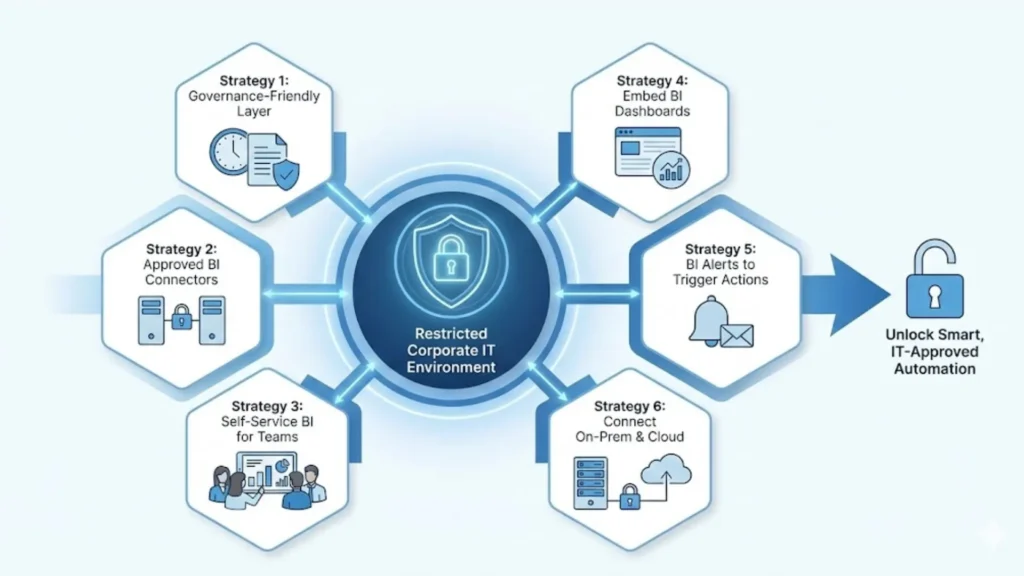
In a lot of locked-down corporate IT setups, BI tools are already approved and trusted, which makes them a great place to start with automation. Since BI platforms follow strict security and governance rules, you can use things like data models, scheduled refreshes, and role-level security to automate how information moves around without fighting IT policies.
Instead of having to spend hours compiling spreadsheets and pulling information together from various sources, a BI report can just auto-refresh and do the job for you making it easier to get BI automation going while keeping everything inside the secure, governed workflows corporate IT needs.
In many restricted IT environments, IT only allows certain approved connectors, which makes custom integrations pretty much impossible. But BI tools already come with trusted BI data connectors like SQL, APIs, and SharePoint that fit safely within those rules.
By using these built-in connectors, you can automate how data gets pulled in without stepping outside IT’s boundaries. Solutions like Data Inseyets make it even easier to manage and streamline these integrations securely. For example, a secure data gateway can automatically extract data from an ERP system or an old legacy database on a set schedule. It’s an easy, safe way to bring automation into your workflow while keeping everything compliant and secure.
Strategy 3: Let Teams Use BI Safely to Cut Down Manual Reporting
Self-service BI tools make it easy for teams to analyze and visualize data without needing to involve IT. It also cuts down a lot of repetitive enterprise reporting work. For example, a finance team can use approved, controlled datasets to create automated dashboards instead of rebuilding the same reports each month, bringing self-service BI closer to data democratization while still keeping everything governed and secure.
Most companies can’t change their core systems like ERP or CRM because of compliance rules or vendor limits. Instead of trying to rebuild anything, you can simply embed BI dashboards into the workflows people already use. This brings embedded BI and automated insights right into legacy systems without touching the system itself. A common example is adding Power BI dashboards inside SharePoint or a company’s internal portal. It’s a smooth way to move toward legacy systems automation with simple workflow integration.
BI tools can send alerts as well whenever something important changes, thus allowing teams not to constantly watch each metric manually. These BI alerts work like early automation triggers, and subscriptions can automatically send updated insights to the right people. Examples include Alert Notifications regarding stock shortages, Key Performance Indicator (KPI) drops and compliance issues. It’s a quick win for workflow automation through automated notifications and easier KPI monitoring.
IT environments can block direct cloud integration, but BI gateways enable secure connections between on-premise systems and Cloud Workflows. This lets you use hybrid BI to automate cloud reporting while keeping all sensitive data stored on-prem, where you can run cloud dashboards or scheduled cloud-based automations even though the actual data never leaves your secure environment. It’s a safe path to cloud automation using a trusted, secure data gateway.
When picking a BI tool in a restricted IT setup, IT teams usually check for certifications, strong security, compliance, and encryption as well to make sure everything is safe.
Enterprise-grade BI tools, like Power BI, often already meet these strict requirements, so they’re easier to get approved.
Look for features that support BI automation at scale, like scheduled data refreshes, alerts, self-service analytics, and secure connectors, so you can automate workflows without breaking any rules.
Choosing the right tool makes it much easier to balance secure BI tools with real enterprise automation needs.
When it comes to automation in locked-down IT environments, traditional tools often just don’t fit because of security, compliance, or legacy system limits. BI automation strategies give you a way to get things done without hitting those walls.
Traditional BI automation tools often don’t allow for the discovery of automation in a secured and/or compliant manner and therefore limit their use when it comes to placing the automation outside on “the edge”. BI Automation strategies allow users to overcome these limitations.
BI lets you automate reporting, alerts, and data workflows while keeping everything safe, governed, and compliant.
If you’re ready to make work easier, look into enterprise BI dashboards, consulting, and automation pathways to start unlocking smart, IT-approved automation.